Using OP-TEE as a Cryptography Engine

summary
Shows how to turn OP-TEE into a real crypto engine by implementing a hardware RNG (three API hooks including crypto_rng_read), registering accelerators with drivecrypt_register, and exposing ops to Linux via the TEE client and kernel crypto registration. Builds a TA that uses transient and persistent objects, supports atomic replace (overwrite) to avoid corruption, and a userland wrapper or kernel provider for apps. Warns against custom OpenSSL engines and recommends AF_ALG or PKCS#11 (Linaro pkcs11ta/libcktc pending) and notes Microsoft’s TPM2.0 firmware for OP-TEE.
AI-written summary · about
chapters (38)
- 0:00Intro
- 0:45The Internet of Things is Here
- 1:37How Do We Store Things Securely?
- 2:14SoC Security Features
- 3:48What is OP-TEE?
- 6:31Outline
- 6:41OP-TEE New Platform Bring-up
- 7:49Background
- 8:42RNG Driver Plan
- 8:59Crypto RNG API
- 10:28Basic Driver Implementation
- 11:37Configuration
- 12:26HW Crypto Accelerators
- 14:27crypto hash.ops
- 15:33Peek into alloc
- 16:03What is drvcrypt?
- 17:08drvcrypt flow
- 18:32Initialization and Registration
- 19:53HW Alloc Implementation
- 20:19HW Context Struct
- 22:24Accessing OP-TEE From Linux
- 24:24Trusted Application
- 25:31What is a TEE Operation?
- 26:13What are TEE Objects?
- 28:43Minimal TA Interface II
- 29:46Minimal AES code
- 30:09Minimal Example Caveats
- 31:09Building a Secure Storage System
- 32:00Storage Application Flow
- 34:54Slot Ops
- 35:04Opening a Slot
- 38:02Remaining TA Pieces
- 40:40Linux Userspace Access Library
- 41:27Linux kernel Integration
- 43:04struct cipher alg
- 44:11OpenSSL Integration
- 45:49PKCS#11
- 48:44Summary
related talks
 11mOP-TEE open-source security for the mass-market
 41mOP-TEE - Using TrustZone to Protect Our Own Secrets
 34mA Journey To the Secure World of OPTEE From the Non-secure World of Linux
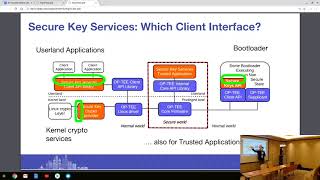 52mBuild secure key management services in OP-TEE
 39mKernel TEE subsystem evolution
 39mHands-on OP-TEE with Andes RISC-V
 10mLightning Talk: A Trusted OS for RISC-V ? OP-TEE is a Candidate
 48mOP-TEE: Using the ARM Trust-Zone to Control Tamper Resistant Processors