Rescribe: Authoring and Automatically Editing Audio Descriptions
summary
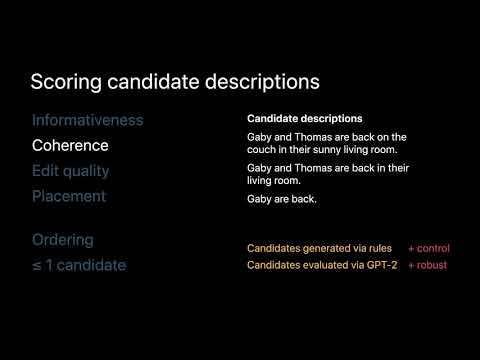
Rescribe auto-edits author-written descriptions by generating 200–300 candidate compressions per caption, scoring them for informativeness, coherence (using GPT-2), edit penalties, and timeline placement, then selecting edits and start times with dynamic programming. It shortens or deletes text, shifts timing, or lengthens source audio via subtle looping to create three outputs including extended inline descriptions. Novice describers cut placement overlap errors from ~45% to 0%, blind viewers prefer the Rescribe-edited and extended-inline outputs, and experts accept it for workflow integration.
AI-written summary · about
chapters (12)
- 0:00Intro
- 0:19Videos provide information
- 0:55Interpretive Ranger
- 1:28Identifying audio gaps
- 1:59Editing descriptions
- 5:24Algorithmic methods
- 5:55Generating candidate descriptions
- 6:38Scoring candidate descriptions
- 10:14User evaluations
- 11:33Related work
- 12:42Future research opportunities
- 13:48Rescribe Authoring and Automatically Editing Audio Descriptions
related talks
 45mAccessible Audio & Video
 10mAutoDub: Automatic Redubbing for Voiceover Editing
 21mQuickCut: An Interactive Tool for Editing Narrated Video
 29mUsing Amazon Transcribe to make content searchable and accessible
 54mSounding out the web
 51mCaptions and Beyond Scaling Media Accessibility Audits for Title II Compliance
 19mVidCrit: Video-based Asynchronous Video Review
 38mDemystifying Captions