~/talk

Web Accessibility made easy for WordPress
Talkat WordCamp Asheville 2019 · 2019-06-08..06-09· [accessibility, wordpress]
links:none on file
slides:none on file

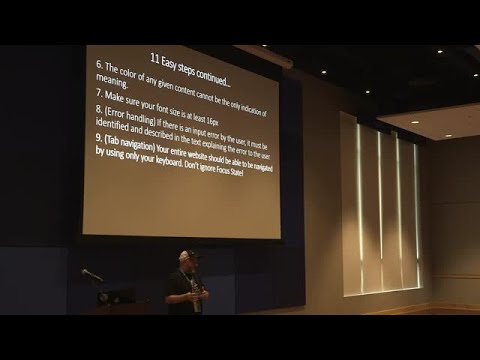
Explains WCAG 2.1 and Section 508 and then offers 11 actionable steps you can apply immediately — add alt text for all non‑text media, label form elements, include captions and audio descriptions, and use Gutenberg to mark images as decorative. Cites over 2,200 accessibility lawsuits and rapid growth. Recommends free audit plugins, a Contact Form 7 accessibility plugin, and practical fixes that cut remediation time while improving real compliance.

AI-written summary · about

  1. 0:00Introduction
  2. 1:04Web Accessibility
  3. 1:19Our Story
  4. 2:59Outline
  5. 3:24Facts
  6. 4:09Lawsuits
  7. 5:28Lawsuit graph
  8. 6:39Lawsuit stats
  9. 7:18What is Section 508
  10. 8:19Four main ideas
  11. 9:52Why does Section 508 exist
  12. 11:04Provide alternative text
  13. 11:41Add a picture
  14. 12:27Add form elements
  15. 13:15Contact form
  16. 13:33Closed Captions
~/search
type to search 6,518 conferences, 143,918 speakers and 192,133 talks
~/help
cmdctrl k
search every conference, speaker and series
/
focus the filter search
h
home
c
conferences
s
speakers
e
series
t
light / dark — the status bar button does the same
← →
on a talk: 5 seconds back / forward
0–9
on a talk: jump to 0%–90% of the recording
?
this help
esc
close this, then clear every filter — or just the search, while you are typing in it

Ignored while you are typing. Pages without a filter rail have no search to focus.