JupyterLite: run all your code in a web browser using WebAssembly
summary
JupyterLite runs entirely in the web browser using WebAssembly, demonstrating CPython via pyodide and xeus-python kernels, compiled C++ notebooks (a ray tracer) and a browser terminal with git and vim that all actually execute in demos. Deployment builds produce a static site that scales to millions with only static files and can be hosted on GitHub Pages; notebook.link adds cloud storage and caching. Limitations include single-thread/multiprocess constraints, poor handling of very large datasets, and fixed kernel Python versions.
AI-written summary · about
chapters (22)
- 0:00Introduction
- 1:49JupyterLite demo
- 3:15JupyterLab vs JupyterLite
- 6:02JupyterLite scalability
- 7:24Python in browser with WASM
- 9:55Language kernels
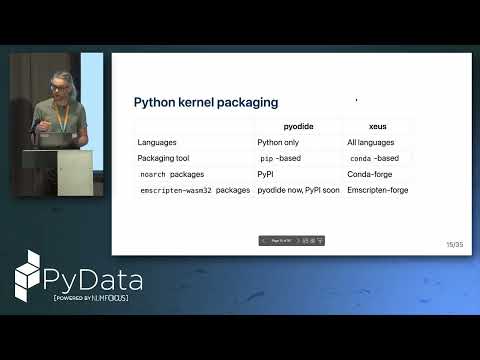
- 10:38Pyodide vs XPython
- 13:52Package management in WASM
- 16:30Local storage & files
- 19:18Runtime package install
- 21:01C++ in browser
- 22:02Jupyter GIS demo
- 23:27Use cases
- 24:33Limitations
- 25:57Terminal & editor support
- 27:25Jupyter AI demo
- 29:11Embedding JupyterLite in documentation
- 30:16Deploying JupyterLite
- 33:22Live deployment
- 35:05GitHub Pages deploy
- 36:11NotebookLink platform
- 37:53Future roadmap
related talks
 35mJupyterLite: Jupyter ❤️ WebAssembly ❤️ Python
 31mJupyterLite, Emscripten-forge, Xeus, and Mamba
 29mExpanding Programming Language Support in JupyterLite
 27mBuilding web-based engineering applications with JupyterLab components
 31mBrowser-based AI workflows in Jupyter
 45mHow to run Python in the browser
 41mPyodide: A Python distribution for the browser
 31mIodide and Pyodide: Bringing Data Science...