Is your app for everyone? A primer on accessibility for Android

summary
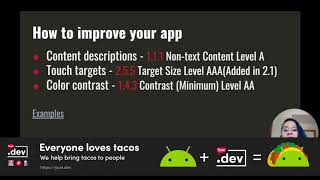
Android accessibility matters with concrete wins: about 1 billion people (≈15% of the world) can benefit, and left‑handed or color‑blind users are nontrivial markets. Practical items include using TalkBack and Switch Access support, running Accessibility Scanner plus Android Studio lint, Espresso accessibility checks and the Google Play pre‑launch report, and following measurable rules: 48dp touch targets, contrast ratios 4.5:1 (small) / 3:1 (large), contentDescription / labelFor and importantForAccessibility. Several real projects (Google Lookout, Outbarriers, Joubert’s guitar) prove these approaches work.
AI-written summary · about
chapters (25)
- 0:00Start
- 3:47Report on accessibility (WHO)
- 6:29Visual
- 7:44Cognitive impairments
- 8:44Did you know?
- 11:53Accessibility services
- 15:41SwitchAccess
- 17:01Font/Display size
- 18:18Don't rely on colours to indicate state
- 18:38Contrast ratio
- 20:11Ensure touch size is enough
- 20:50Use sp (scalable pixels)
- 21:14Ensure proper TalkBack navigation
- 24:01Improve UX if there's a spoken accessibility service enabled
- 25:04Use custom views the right way
- 25:53Lint
- 26:19Simulate color space
- 26:49Accessibility Scanner
- 27:49Espresso
- 28:08Pre-launch report
- 28:29Not a developer tool but...
- 29:08Let's talk the same language
- 29:28Continuous feedback
- 30:03Accessibility advocate role
- 32:31Take aways from this talk
related talks
 39mEasy Android Accessibility
 01h 01mAndroid for Everyone: Accessibility in Android
 22mAndroid Accessibility: Understanding Blind Users to Meet Their Needs
 12mThe Secrets of Android Accessibility
 37mAccessibility on Android in 2019
 40mAccessibility on Android in 2019
 24mBenefits of Making Your Apps Accessible
 32mMaking Android accessibility easy